Connor Boetig
Technology and Information Design student at the University of Maryland, graduating May 2027. I like creating systems and making them look good for everyone.
Technology and Information Design student at the University of Maryland, graduating May 2027. I like creating systems and making them look good for everyone.
INST367 · 2026 · Team Project
A Canvas redesign for UMD students. Mobile-first. Built by a team of four.
The reality of being a UMD student
courses every semester.
confidence in the Canvas calendar.
Every student we talked to keeps a backup system. A separate calendar, a Notion doc, a screenshot folder. Canvas alone doesn't earn the trust to be the one place they check.
Context
The assignment was to redesign a service people actually use and we picked Canvas. Everyone at UMD has to use it. Pretty much everyone has something they complain about. Our team (me, Aayusha, Nahjah, and Brian) spent the second half of the semester pulling out what's actually frustrating about Canvas and turning those fixes into a design. We called it Better Terp.
Mobile first
The Canvas mobile app is where students hit the most complaints, mentioning calendar bugs, missing features, and repeated logins. If we fix the phone experience, students will actually use it.
5+ courses at once
Nobody we talked to was tracking just one or two classes, it was always 5 or 6. The design had to account for this with purposeful UI.
Trust over flash
Our interviewed students mentioned keeping a separate calendar or Notion doc because Canvas tends to miss details. The redesign had to actually be trustworthy and not just look nicer.
Process · Research
Before sketching anything we interviewed each other. What kept coming up is nobody actually uses Canvas the way Canvas wants, everyone seems to have their own workaround. We synthesized everything we heard into an affinity map and three themes fell out.
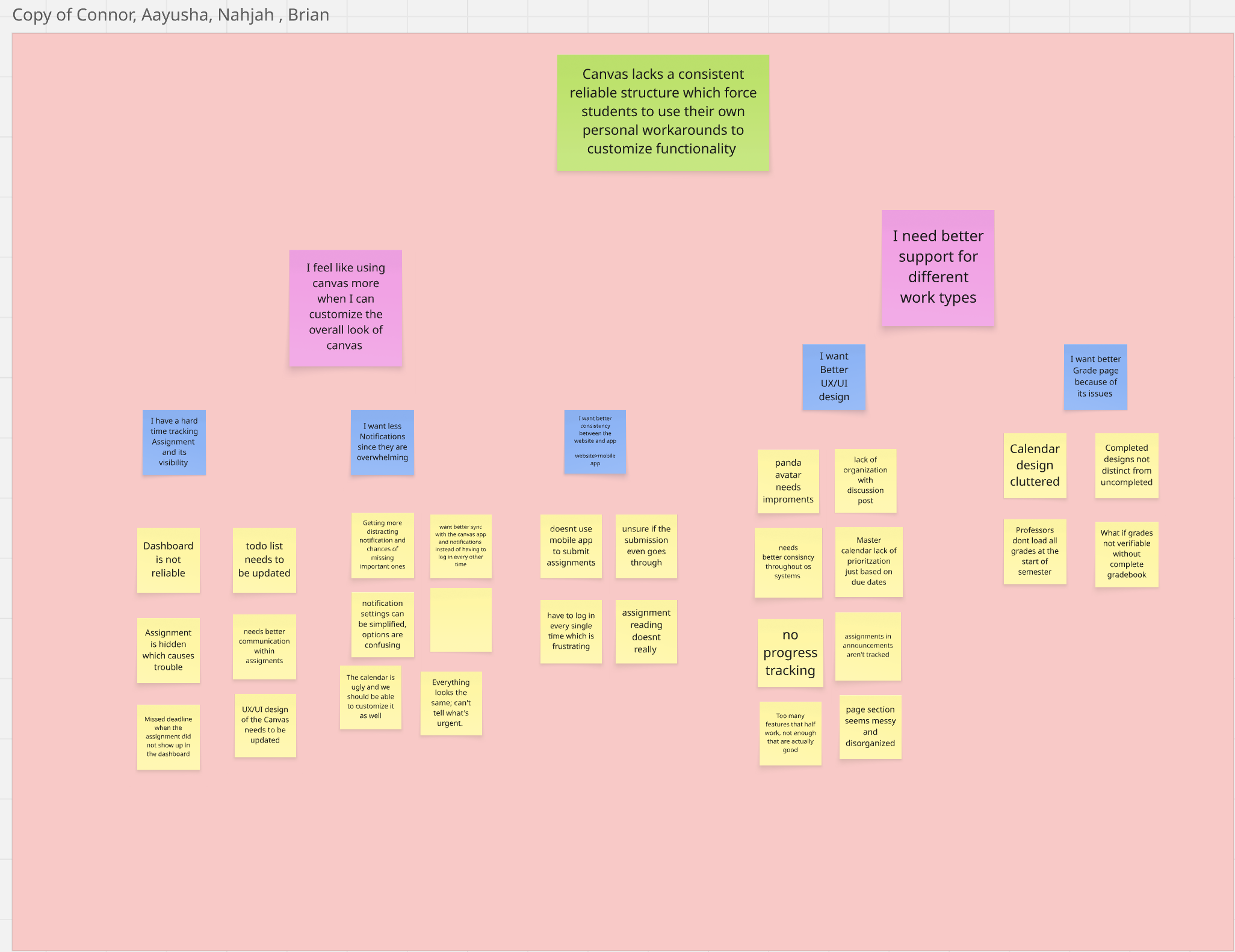
Theme 1
Every professor organizes their course page differently. Finding work turns into a treasure hunt every single time.
Theme 2
Dashboard, calendar, to-do list, notifications. All of them have gaps that push students to external backup systems.
Theme 3
Repeated logins, missing features, sync issues. Students avoid the app and use Safari, which means Canvas is even less reliable.
The pattern that hit us
Every student we interviewed had a personal workaround. Notifications turned off. Calendar bypassed. Mobile app skipped. Same complaint, a hundred different shapes.
Process · Ideation
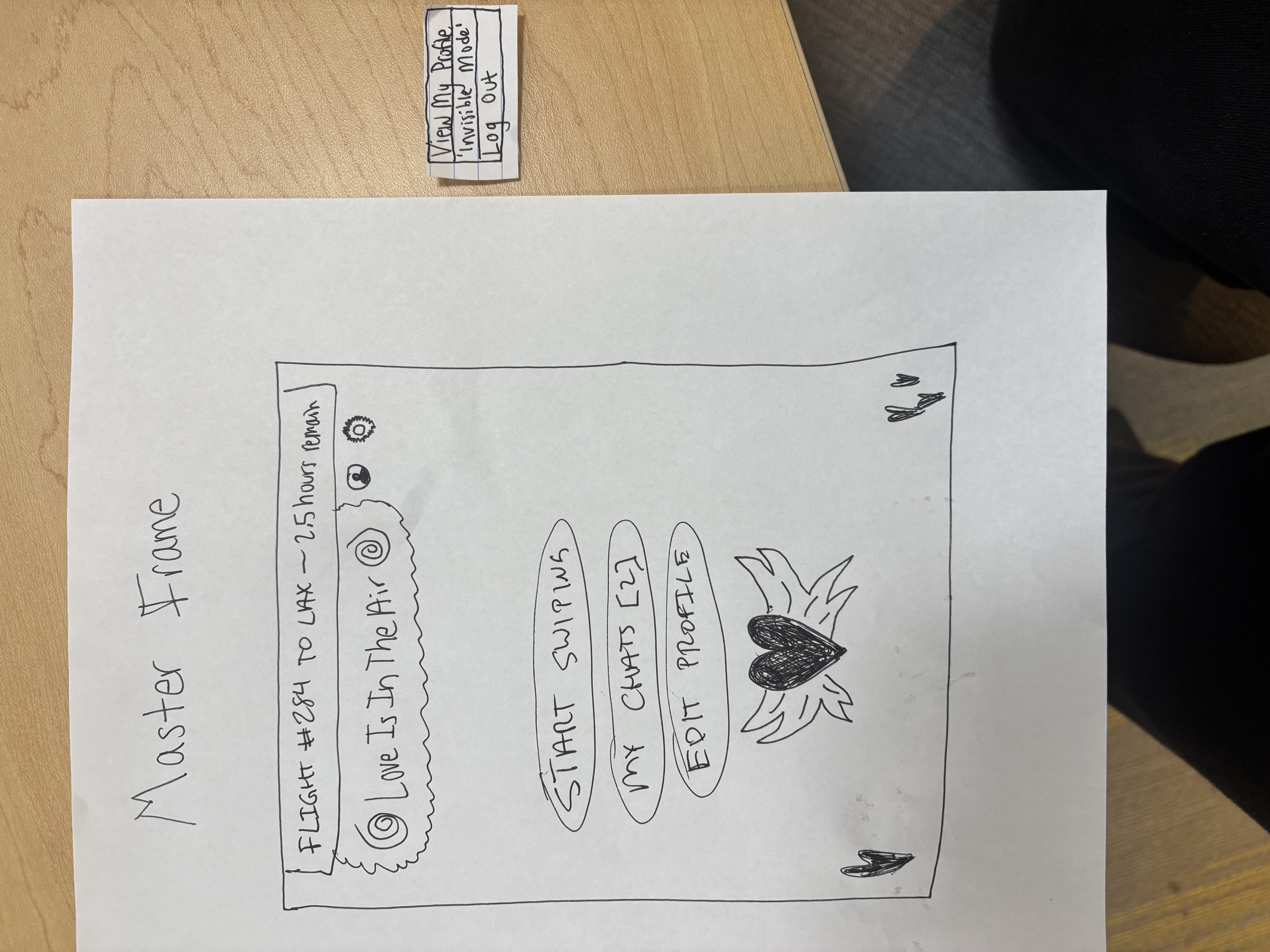
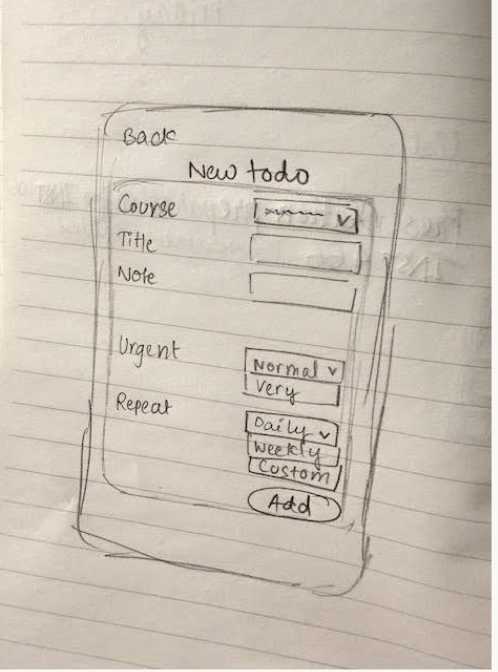
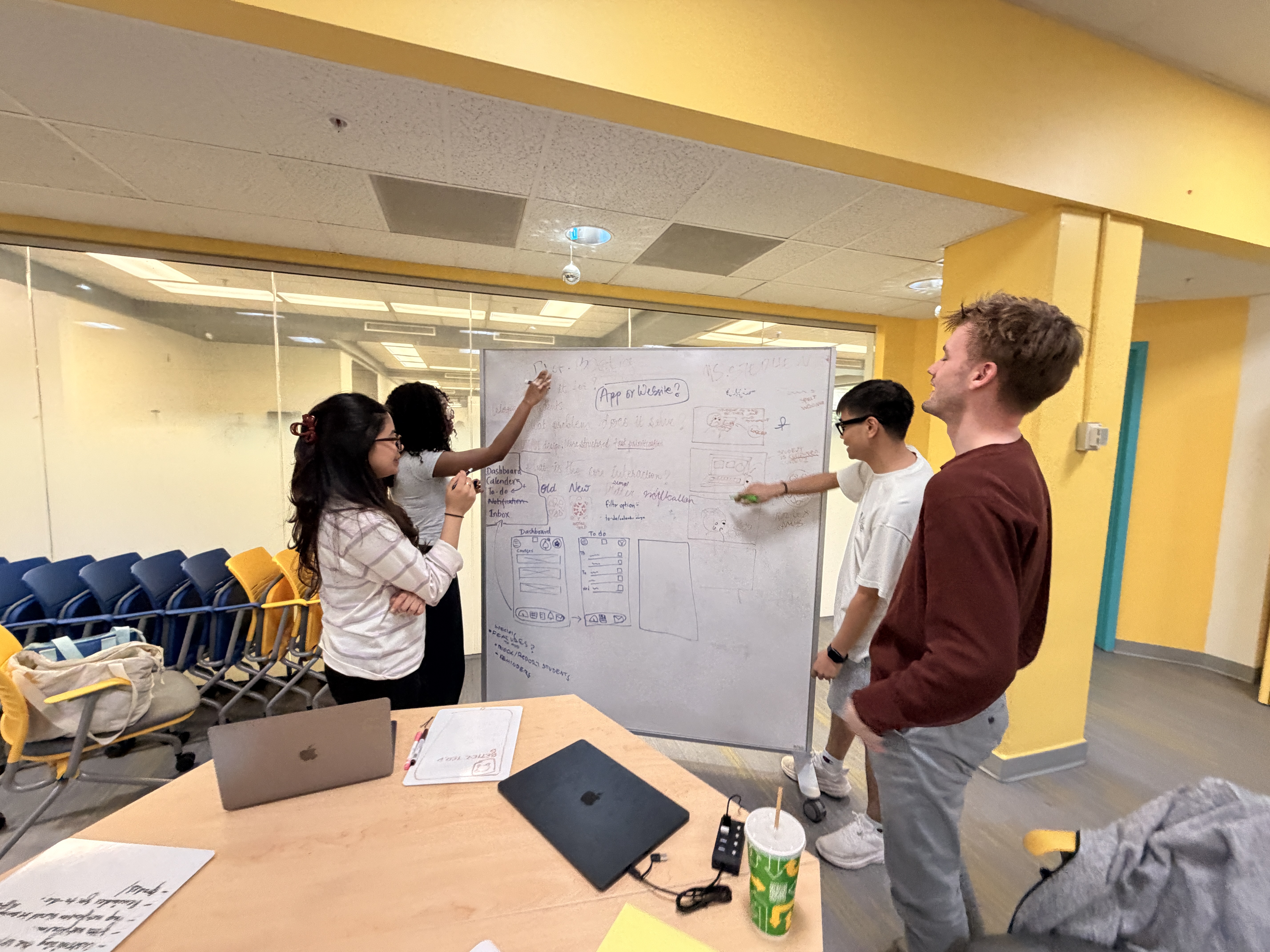
We started with a whiteboard brainstorm. Most of the early ideas were just better versions of Canvas tabs. But we realized instead of organizing by course like Canvas or by deadline like a calendar app just organize by what you need to do right now. A to-do list as the front door and everything else feeding into it. Once we had that the rest of ideation flowed much easier.
Process · Iterations
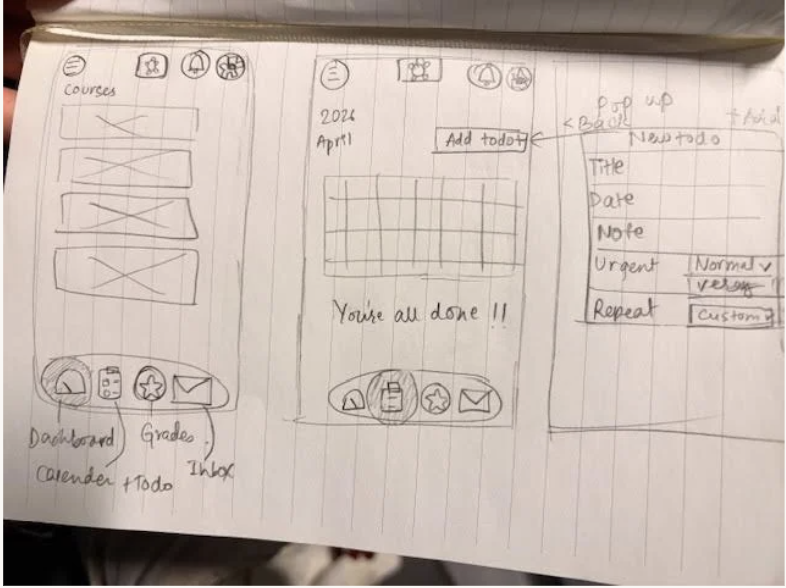
B4 · Mid-Fi
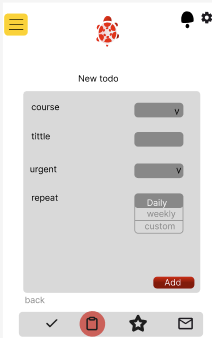
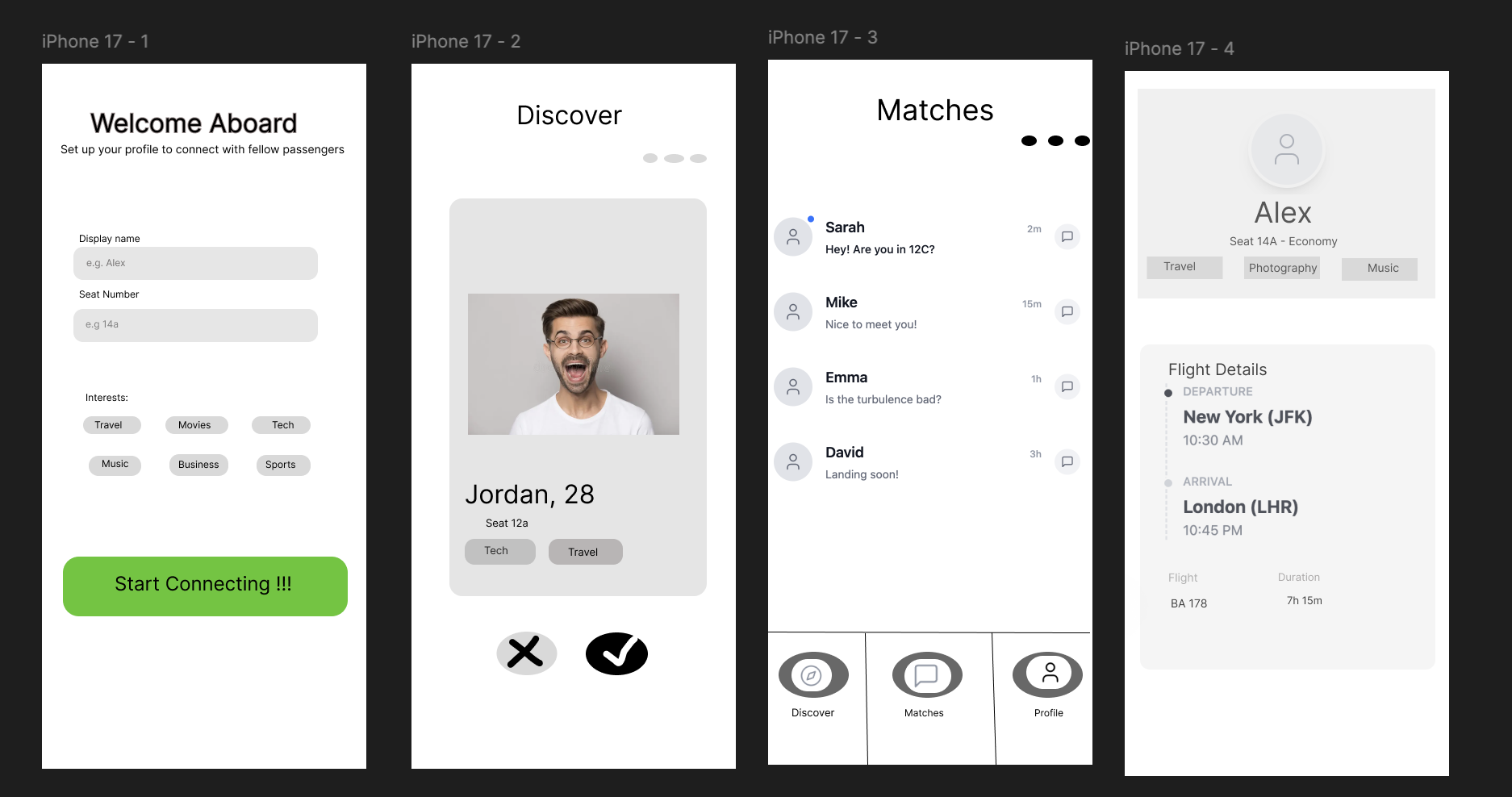
A gray-box mid-fi to test the flow before doing any visual design. Five screens. Welcome and sign-in. A dashboard with an empty state. Courses list. New-todo form. Profile. No branding yet. Just structure.
B5 · User Testing
We watched students walk through the mid-fi prototype and say "okay what do I do" out loud. The layout landed clean and the navigation made sense. But a few things broke immediately. Nobody could tell what nav icons meant. Course codes meant nothing without checking your schedule. And there was no due date or time on any todo, which we knew right away we had to add.
Simplicity works but students need due dates to actually trust the app. The mid-fi proved the structure, then in the high-fi we built off that to gain trust.
B6 · High-Fi
Final prototype with full visual design. Red turtle. Brand colors. Real screens. Every issue from B5 got fixed. Due date and time on every todo. Full course names instead of codes. Auto-sort by due date with urgency tags. Labeled nav icons. This was a great improvement.
Process · Decisions
Due dates and times on every todo
The biggest miss in mid-fi was treating todos like titles with categories. The second a tester tried to add one they asked "okay but when's it due?" Adding due dates ended up being the biggest change between mid-fi and high-fi.
Course names instead of course codes
"INST367 Prototyping and Development Studio" instead of just "INST367." Testers couldn't match codes to classes especially with five or six going at once. The longer name eats more space but you instantly know which class it is. This is something I struggle with, I was suprised to see I couldnt see that to begin with.
Labels on every nav icon
Same lesson Project A taught me. A clipboard icon could be a to-do or a notes app or a checklist. A text label under each icon takes a few pixels and just makes it obvious.
Default sort is "what's due first"
Auto-sort by due date with the most urgent thing at the top. People said they trust the app more when it does the sorting instead of making them drag stuff around.
A dashboard that leads with what's next
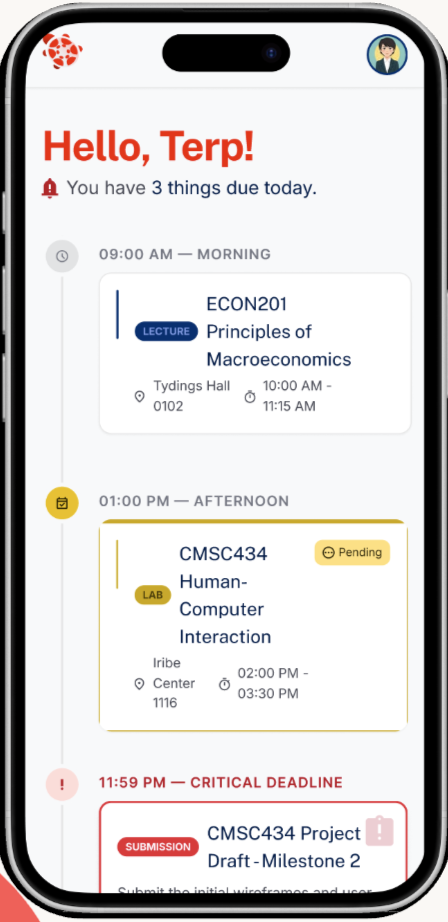
Instead of dumping every assignment the dashboard opens with "You have 4 things due today" and a timeline. The point is to kill the "wait what am I missing" feeling students get when they open Canvas in the morning.
The outcome
All of Canvas, condensed into a few main screens you'll actually open.
Final Outcome
The final prototype effectively covers almost everything students open Canvas for. Same look and same nav across every screen. Something Canvas itself never pulled off.
Dashboard
"Hello, Terp." A time-sorted timeline of what's due today, color-coded by urgency. The first thing students see when they open the app.
Grades
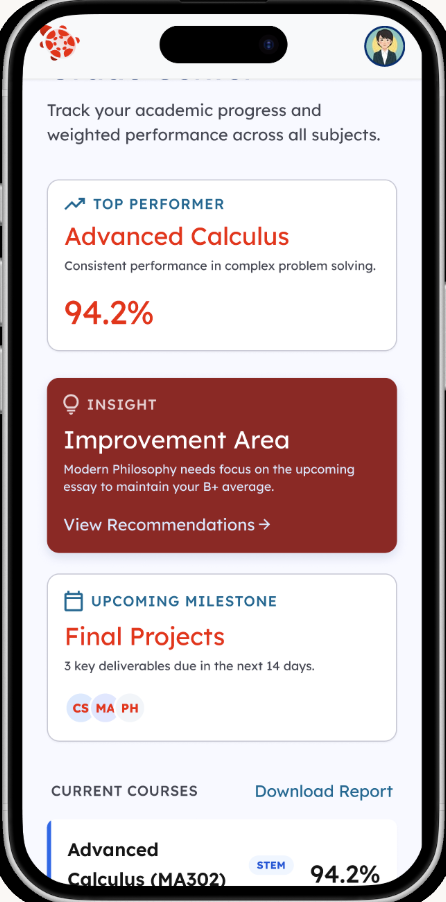
Course-by-course performance with quick callouts like top performer and improvement area, plus a semester GPA summary at the bottom.
Calendar
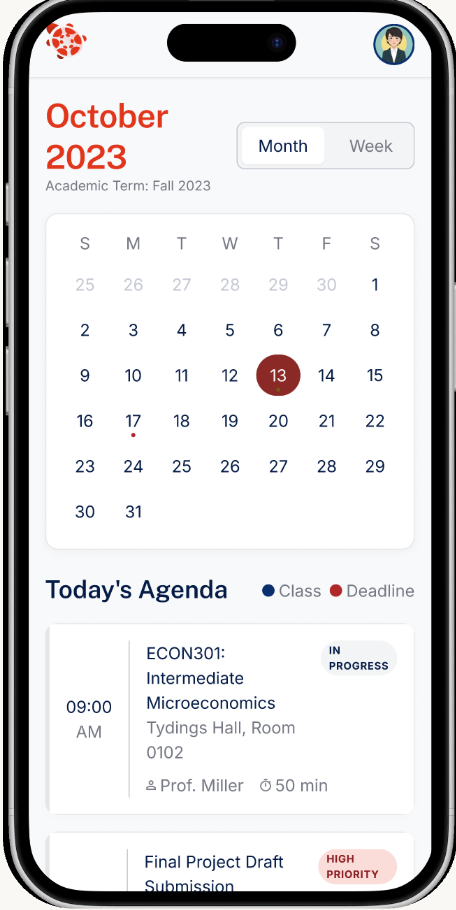
Monthly view with class periods and deadline markers, plus today's agenda underneath. The longer-horizon view for when you need to plan.
Notifications
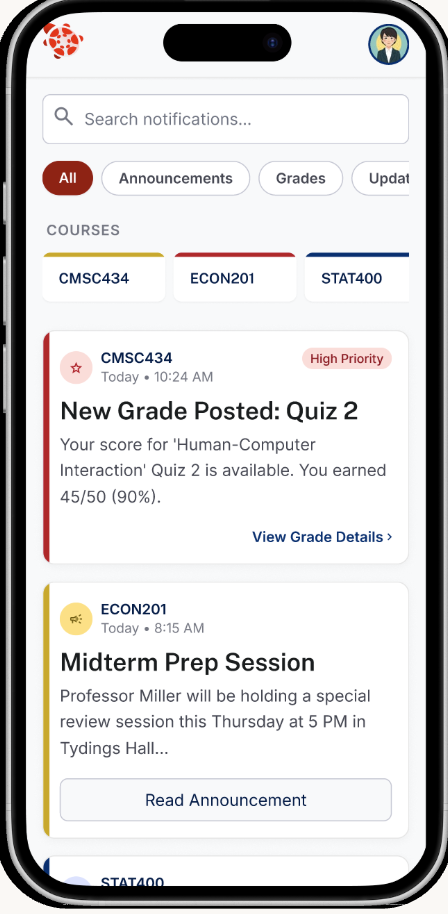
Grade alerts filtered by course with the option to mute by category. The fix for Canvas dumping every announcement and comment.
You sign in once with your UMD credentials and the app remembers you. No more logging in every five minutes. The dashboard is the first screen you see. It shows what's due today in time order so you always know what's next. Bottom nav gets you to Grades, Calendar, and Notifications and they're all labeled. Every screen uses the same layout and urgency colors so once you've figured out one you've figured them all out.
It cleans up the scattered Canvas mess into one place that actually feels consistent.
Time-based sorting kills the "what's urgent" guessing students do in their heads every morning.
Course names everywhere so you don't have to translate codes in your head.
Labeled nav and color-coded urgency on every screen. The part Canvas itself most fails at.
Built around the to-do list because that's the one Canvas feature every student we talked to already trusts.
Reflection
Listening across four students
From user testing and interviews, students kept giving us different versions of the same complaint. Canvas isn't broken in one big way. It's broken in a bunch of small ways and every student has built their own patches around it. The affinity map was where that pattern showed up.
Gray boxes hide content problems
Mid-fi gray boxes catch flow problems but they hide content problems. We didn't realize "no due date field" was a miss until a tester tried to actually use it and asked "okay but when's it due?"
Course codes are obvious until they aren't
Course codes seem obvious until you're not in the class. Designing for someone juggling five or six courses meant assuming nobody can instantly map "INST454" to "Project Development Studio."
A team of four is its own design problem
Working on a team of four was way different from doing Project A solo. Decisions took a bit longer because everyone had opinions, but the design was more thought through and solid with 4 eyes on the same problem.
Actually wiring it up to the Canvas API so todos pull from real assignment data instead of mock data.
A standardized course page template that professors actually use so the structure problem gets fixed at the source.
Customizable push notifications that only fire for urgent things and not every announcement and grade and comment.
Built for INST367, Spring 2026.